
React Rendering: Legacy vs Concurrent Mode

Overview: Two Different Worlds
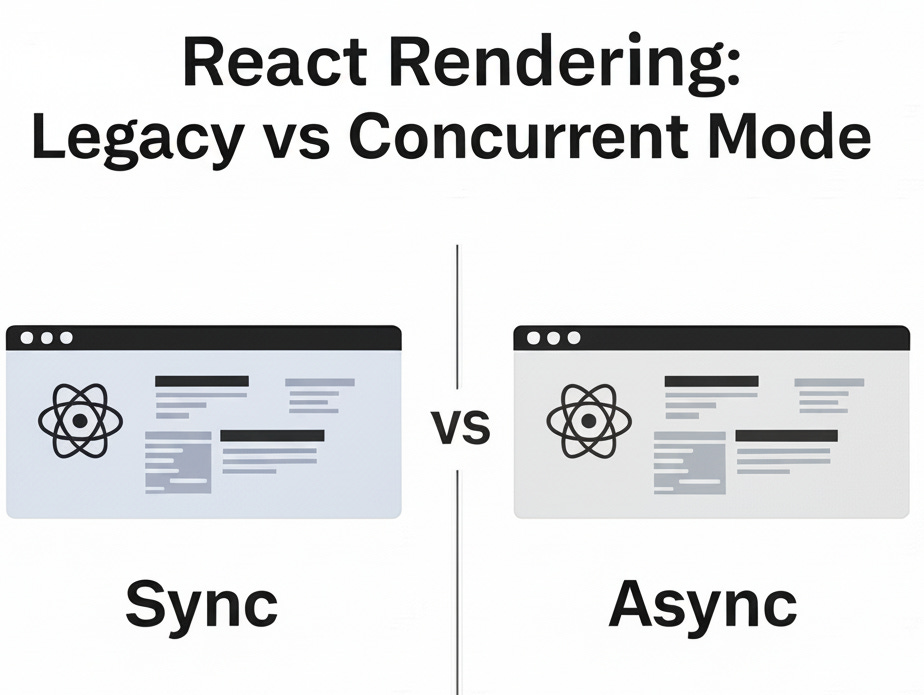
React has two rendering modes that work completely differently:
Legacy Mode: Synchronous, blocking (the old way)
Concurrent Mode: Asynchronous, interruptible (the new way)
Legacy Mode (Synchronous Rendering)
The Complete Flow
1. Starting the Render
You call
ReactDOM.render()to display your componentThis is the "old-fashioned" synchronous method
2. Setting Up
React calls
legacyRenderSubtreeIntoContainer()It checks if there's already a root container
Since it's the first render, React creates a new "fiber root" (React's internal tree structure)
3. Creating the Update
React creates an update object for your changes
This update gets added to a queue
The update is scheduled on the fiber root
4. Processing the Work (Render Phase)
Because it's legacy mode, React calls
performSyncWorkOnRoot()This runs a synchronous work loop that processes each piece of work
React goes through each fiber node (think of these as React's internal representation of your components)
It compares old vs new props and builds a new fiber tree
For "Hello World", this means creating fiber nodes for the h1 element
5. Committing Changes (DOM Update Phase)
After the render phase, React calls
commitRoot()This is where React actually updates the real DOM
React looks at the finished fiber tree and finds what needs to change
For new elements, it finds "Placement" effects (things that need to be added)
React calls
commitPlacement()to insert the new elementFinally, it uses
appendChild()to add your h1 to the actual webpage
Legacy Mode Visual Flow
User Action → ReactDOM.render() → Create Update → Schedule Work
                                                        ↓
DOM Update ← Commit Phase ← Render Phase ← performSyncWorkOnRoot
    ↓              ↓              ↓                    ↓
appendChild    commitRoot    Build Fiber Tree    Synchronous Loop
                                                        ↓
                                           BLOCKS MAIN THREAD
Key Problem: Everything happens in one blocking sequence - the main thread is frozen until complete.
Concurrent Mode (Asynchronous Rendering)
How Concurrent Mode Enables Non-Blocking Operations
1. Time Slicing
Concurrent mode breaks work into small chunks called "time slices":
Legacy Mode:
[████████████████████████] ← One big blocking task (16ms+)

Concurrent Mode:
[███][███][███][███][███] ← Multiple 5ms chunks with breaks
     ↑     ↑     ↑     ↑
   yield yield yield yield (let browser breathe)
2. Work Loop Differences
Legacy (Synchronous):
function workLoopSync() {
  while (workInProgress !== null) {
    performUnitOfWork(workInProgress); // Never stops
  }
}
Concurrent (Interruptible):
function workLoopConcurrent() {
  while (workInProgress !== null && !shouldYield()) {
    performUnitOfWork(workInProgress); // Can be interrupted
  }
}
3. The Scheduler's Role
The Scheduler decides when to pause work:
Browser Frame (16.67ms for 60fps):
┌─────────────────────────────────────┐
│ [React Work: 5ms] [Browser: 11ms]  │ ✅ Smooth
└─────────────────────────────────────┘

vs Legacy Mode:
┌─────────────────────────────────────┐
│ [React Work: 20ms] [Browser: 0ms]  │ ❌ Janky
└─────────────────────────────────────┘
How Asynchronous Mechanisms Improve Performance
1. Prevents Blocking the Main Thread
Timeline with Concurrent Mode:
0ms   5ms   10ms  15ms  20ms  25ms  30ms
├─────┼─────┼─────┼─────┼─────┼─────┼
│React│Anim │React│Anim │React│User │
│Work │     │Work │     │Work │Input│
└─────┴─────┴─────┴─────┴─────┴─────┘
      ↑     ↑     ↑     ↑     ↑
    Yield  Yield  Yield  Yield  Yield
2. Prioritized Updates
Not all updates are equal:
User Input (Urgent):     ████████████ (Immediate)
State Update (Normal):   ████████     (Normal)
Data Fetch (Low):        ████         (Low)
3. Improved Perceived Performance
Responsive UI: Clicks and typing feel instant
Smooth Animations: No frame dropping
Better UX: App doesn't "freeze" during large updates
Scheduling and Priorities in Modern React
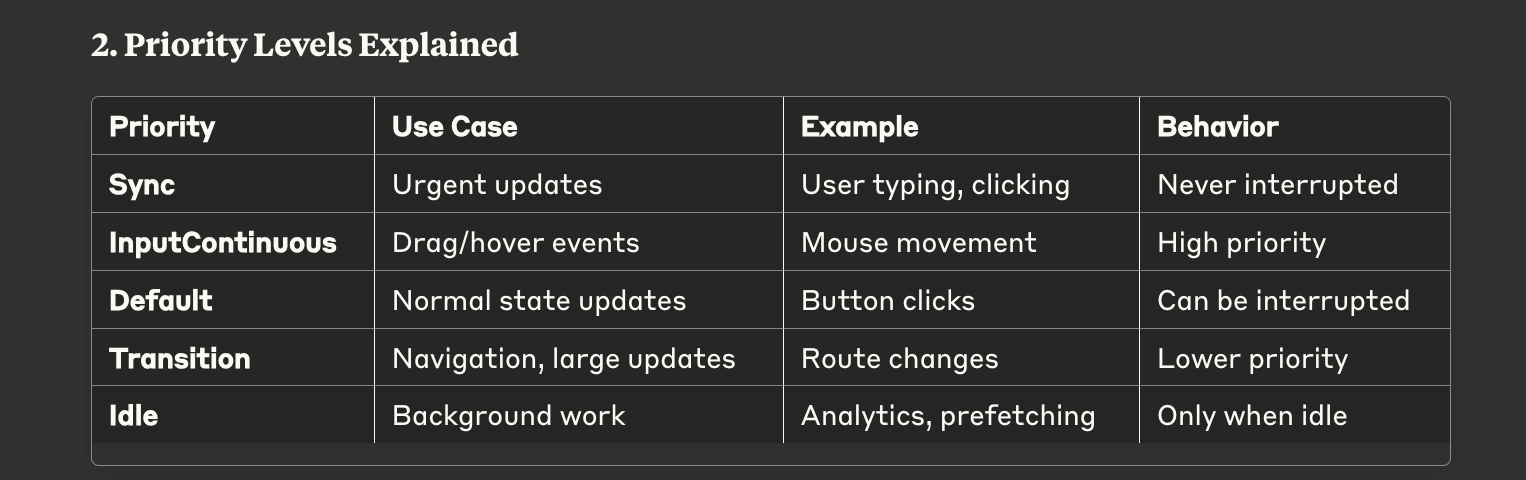
1. Lane-Based Priority System
React 18+ uses "lanes" to manage priority:
Lane Priority (Higher = More Urgent):

32-bit Binary Lanes:
SyncLane:           00000000000000000000000000000001 (Highest)
InputContinuousLane: 00000000000000000000000000000100
DefaultLane:        00000000000000000000000001000000
TransitionLane:     00000000000000000000010000000000
IdleLane:           01000000000000000000000000000000 (Lowest)
2. Priority Levels Explained
3. Scheduling Algorithm Visual
Scheduler Decision Tree:

New Update Arrives
        ↓
    What Priority?
   ┌─────┼─────┐
Urgent   Normal   Low
   ↓       ↓      ↓
Interrupt  Queue  Queue
Current    and    and
Work    Schedule  Wait
   ↓       ↓      ↓
Execute  Execute  Execute
Immediately  Soon  When Idle
4. Real-World Example
// Different priorities in action:

// 1. Urgent: User typing (Sync Priority)
onChange={(e) => setInput(e.target.value)}

// 2. Normal: Button click (Default Priority)
onClick={() => setCount(count + 1)}

// 3. Low: Expensive calculation (Transition Priority)
startTransition(() => {
  setFilteredData(expensiveFilter(data))
})
Concurrent Mode Flow Diagram
User Action → createRoot() → scheduleUpdateOnFiber()
                                       ↓
                            Scheduler Assigns Priority
                                       ↓
                           ┌───────────┼───────────┐
                      High Priority  Normal   Low Priority
                           ↓          ↓           ↓
                    ensureRootIsScheduled()      Queue for Later
                           ↓
                    performConcurrentWorkOnRoot()
                           ↓
               ┌───────────┼───────────┐
        Render Phase              Commit Phase
               ↓                       ↓
    workLoopConcurrent()        commitRoot()
    (Can be interrupted)        (Never interrupted)
               ↓                       ↓
          shouldYield()?           Update DOM
               ↓                       ↓
    ┌─────────┼─────────┐         Complete
   Yes       No
    ↓         ↓
  Pause    Continue
 & Resume   Working
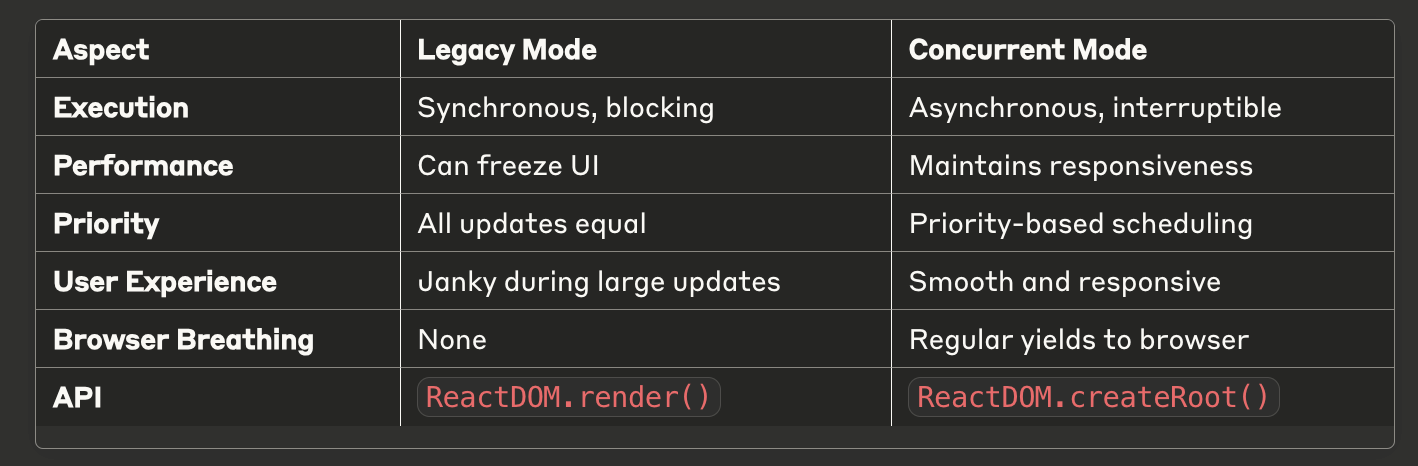
Key Differences Summary
Why This Matters
Legacy Mode Problems:
Large component trees block the main thread
Animations stutter during updates
User input feels unresponsive
"Frozen" app during heavy renders
Concurrent Mode Solutions:
Work is broken into small, interruptible chunks
High-priority updates (user input) interrupt low-priority work
Browser gets regular opportunities to handle other tasks
App feels responsive even during heavy operations
The shift from Legacy to Concurrent Mode represents React's evolution from a purely synchronous rendering system to a sophisticated, priority-aware scheduler that works with the browser's event loop rather than against it.